

FAQ / Self-Learning
Automatically build up an answer base from conversations
Knowledge Base
The employee’s main source of data for answers
Notifications
Alerts about important events in conversations
AI Employees
Employee management and multi-agent scenarios
When to use them
- Certain questions need a strictly fixed answer (address, company details, business hours)
- You need to automatically transfer the customer to another AI Employee when a specific topic comes up
- You want to speed up handling of common requests without spending tokens on “thinking”
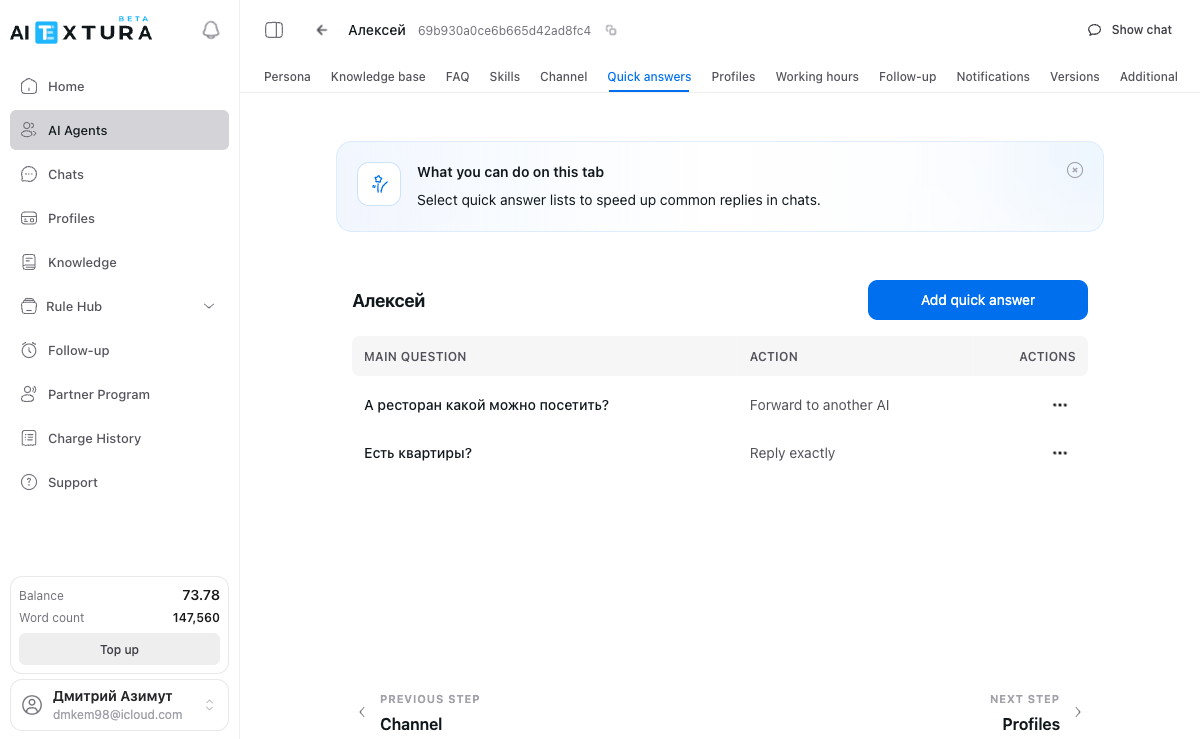
How Quick Answers differ from FAQ
5 action types
1. Reply exactly
The employee sends the customer exactly the text you specified — unchanged, with no adaptation. Good for: addresses, company details, contact information, legal wording that must not change.Exact answers don’t adapt to the conversation context. The customer gets the same text no matter how they asked. Make sure your answer is worded to fit any case.
2. Based on answer
The employee uses your text as a basis but adapts it to the conversation context. You give the employee a “hint,” and it builds a reply that accounts for what the conversation was about. Good for: answers that should take context into account (information about a specific product or service), and situations that need flexibility within a guiding frame.3. Transfer to another AI
The customer is fully handed over to another AI Employee. The current employee stops working on this conversation, and the other one takes over. Good for: a customer contacting you about another department’s topic, or setups where one employee handles first contact and specialized employees do the detailed work. Additional settings:- Employee selection — choose from the dropdown which AI Employee receives the customer
- Instruction — text describing the context of the handover
Video
The video shows a hotel chain example: a “front desk” employee handles first contact and transfers the customer to specialized employees for specific properties.
4. Get answer from another AI
The current employee doesn’t hand over the customer; instead, it requests information from another AI Employee “behind the scenes.” The customer doesn’t see this — they keep talking to the same employee. Good for: when you need expertise from another area but transferring the customer isn’t appropriate; when one employee is the “face” of the company and others act as internal experts. Additional settings:- Employee selection — who answers “behind the scenes”
- Instruction — what to find out from the other employee
5. Expert council
The most powerful option: 2 to 10 AI Employees draft their own answers at the same time, and the system combines them into one final message. Good for: complex or ambiguous questions, complaints and conflicts, questions that need a comprehensive approach. Additional settings:- Employee selection — which AI Employees take part in drafting the answer
- Instruction — a shared task for all experts
- Show expert answers — if enabled, the customer sees each expert’s version (by default, only the final combined answer)
Main question — the trigger
The main question is the trigger the system uses to decide when to run a quick answer. The AI analyzes meaning, not exact word matches, so you don’t need to write the question word for word the way a customer would. Good examples:- “What’s your address?”
- “How do I request a refund?”
- “I have a technical problem”
- “Question about the address” — too vague
- “The customer asks where we are located, what the office address is, and how to get to us by public transport or by car” — too long
The “Simplify” button
Next to the Main question field there’s a Simplify button. It runs an AI that rephrases your question in a shorter, more general form.1
Enter a question
Type the question in the Main question field.
2
Click Simplify
The AI suggests a more concise wording.
3
Check the result
If you like the result, keep it. If not, edit it manually.
- Before: “Could you please tell me the address of your main office?”
- After: “What’s the office address?”
Additional parameters
Chat control
A dropdown that defines what happens to the chat after the quick answer fires. For example, you can pause the chat so a manager can step in.Send notification
A toggle. When enabled, a manager receives a notification whenever the quick answer fires.Step-by-step guides
How to add a quick answer with exact text
1
Open the tab
Go to the Quick Answers tab of the employee you need.
2
Create a new one
Click + Add quick answer.
3
Set the trigger
In the Main question field, enter the trigger question, for example: “What’s your address?”. Optionally, click Simplify.
4
Choose the action
Select Reply exactly.
5
Enter the answer
In the Answer field, enter the exact text the customer will receive.
6
Configure and save
If needed, set Chat control and Send notification. Click Save.
How to set up a transfer to another AI
1
Create a quick answer
Click + Add quick answer.
2
Set the trigger
In the Main question field, enter the trigger, for example: “I have a technical problem”.
3
Choose the action
Select Transfer to another AI.
4
Choose the employee
From the dropdown, select the employee who will receive the customer.
5
Add an instruction and save
In the Instruction field, describe the handover context. Click Save.
How to use Expert council
1
Create a quick answer
Click + Add quick answer.
2
Set the trigger
In the Main question field, enter the trigger, for example: “I want to file a complaint”.
3
Choose the action
Select Expert council.
4
Add experts
Add expert employees (2 to 10).
5
Configure and save
Write a shared instruction for the experts. Decide whether to enable Show expert answers. Click Save.
Quick Answers priority
When a customer sends a message, the employee checks information sources in a specific order. Quick Answers have higher priority than FAQ and the Knowledge Base. If the employee answers a question differently than you’d like (using FAQ or the Knowledge Base), create a quick answer with the wording you want — it will take priority.How many to create
There’s no limit. Practical recommendations:- Don’t duplicate similar wording. If you have a “What’s your address?” trigger, you don’t need a separate “Where are you located?”. Use the Simplify button.
- Don’t overload. Quick Answers are for truly common situations. Let the employee handle rare questions through the Knowledge Base.
- Review the list regularly. Delete outdated quick answers — old addresses, prices, expired promotions.
How it works with other tools
- FAQ — they complement each other. Quick Answers for critical questions, FAQ for everything else.
- Knowledge Base — the “Based on answer” action uses Knowledge Base data to build a personalized reply.
- Notifications — you can combine quick answers with notification triggers.
- AI Employees — the “Transfer to another AI,” “Get answer from another AI,” and “Expert council” actions let you build multi-agent scenarios.
FAQ
How many quick answers can I create?
How many quick answers can I create?
There’s no limit. We recommend not duplicating similar wording — use the Simplify button to generalize instead.
What happens if a question matches several quick answers?
What happens if a question matches several quick answers?
The system picks the one closest in meaning. Try to phrase triggers so they don’t overlap.
How is "Get answer from another AI" different from "Transfer to another AI"?
How is "Get answer from another AI" different from "Transfer to another AI"?
With a transfer, the customer is fully handed over to another employee, who continues the conversation. With “Get answer,” the current employee requests information from another one “behind the scenes,” and the customer doesn’t see it.
Do I have to click Simplify?
Do I have to click Simplify?
No. But it’s recommended if your trigger question is long or uses specific wording. Simplifying helps the employee recognize different variations of the same question.
Can I combine Quick Answers with FAQ?
Can I combine Quick Answers with FAQ?
Yes. Quick Answers and FAQ complement each other. Quick answers always have higher priority.
A quick answer isn't firing — what should I do?
A quick answer isn't firing — what should I do?
Check the trigger wording — it may be too narrow or too broad. Try clicking Simplify and saving again. Test it in the test chat and review the employee’s reasoning (the checkmark next to the reply).
Can I use Quick Answers without a Knowledge Base?
Can I use Quick Answers without a Knowledge Base?
Yes. The “Reply exactly” action doesn’t depend on the Knowledge Base. But for the “Based on answer” action, a Knowledge Base significantly improves answer quality.