

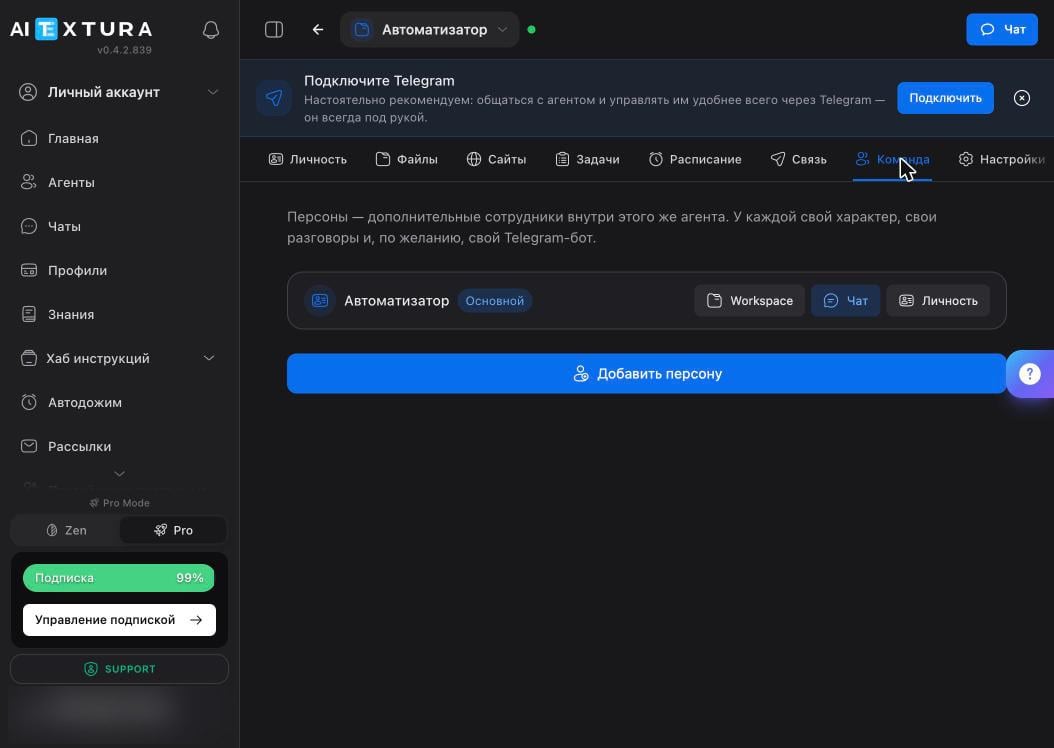
An agent persona is not the same as an AI Employee’s Persona. There, it’s the instructions the AI Employee follows when talking to customers; here, it’s a separate worker inside the agent.
Persona card
A new agent has one persona — the main one, marked with a Main badge. Each card has three buttons.
The + Add persona button creates a new one: give it a name, describe its character, and from then on it works as a separate worker, but inside the same container.
Why split the work
The classic setup is a pipeline where everyone has their own job.
You can give each one its own Telegram bot — then in the messenger they appear as different contacts, and you message whichever one you need directly.
Persona or a second agent
The rule is simple: different roles in the same job — personas. Different jobs — different agents.
FAQ
Can personas see each other's conversations?
Can personas see each other's conversations?
Each has its own conversations, but files and the working environment are shared. To hand work between personas, use a file in
workspace.Can I give a persona its own bot?
Can I give a persona its own bot?
Yes, each can have its own Telegram bot. You create it the same way as the main one — on the Connect tab.
Can I delete the main persona?
Can I delete the main persona?
The main persona is the agent itself, so it always stays. The only thing you can change is its character: the documents on the Personality tab.
How many personas should I create?
How many personas should I create?
Exactly as many as you have distinct roles in one job. A persona you talk to once a month only adds confusion — it’s easier to keep that task with the main one.
What’s next
Personality and Memory
A persona’s character is made of the same text documents
Connect
A separate bot for each persona
Tasks
A shared board that shows all the work
Abilities and Skills
What the container the personas live in can do