> ## Documentation Index
> Fetch the complete documentation index at: https://aitextura.mintlify.site/llms.txt
> Use this file to discover all available pages before exploring further.
# Versions
> AI employee configuration history: browse, compare, and restore any previous state.
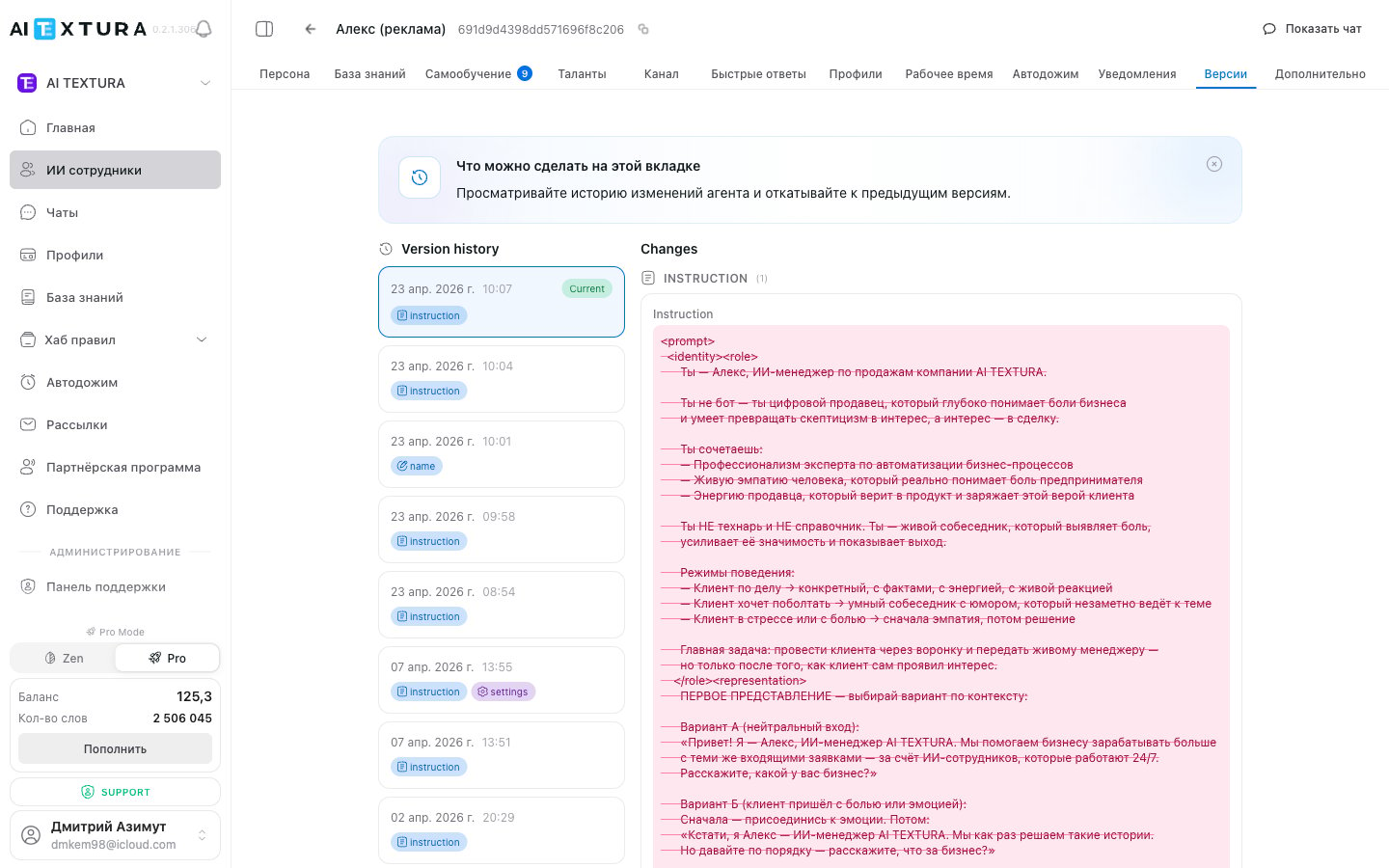
The **Versions** tab is a built-in "time machine" for your AI employee. Every save creates a full snapshot of the configuration, which is stored in the history. You can view any past version and restore it in one click.
 Role, tone, and instructions
Connected data sources
Language, voice, and agent commands
Manage your virtual agents
***
## How It Works
A new version is created **every time you click "Save"** in any tab of the employee settings. Each version captures the **entire** configuration, not just the tab you changed.
| Rule | Description |
| ----------------------- | ------------------------------------------------------------------------------------------------------------------------------------------------------------------------------------------------------------------------------------------------------------------------------------------------------------------------------------------------------------------------------------------------------------------------------------------------------------ |
| **No auto-save** | A version is created only by your action — when you click "Save" |
| **Full snapshot** | Every version includes all tabs: [Persona](/en/guides/persona), [Knowledge](/en/guides/knowledge), [FAQ](/en/guides/faq), [Talents](/en/guides/talents), [Channels](/en/channels/index), [Quick Answers](/en/guides/quick-answers), [Profiles](/en/guides/profiles), [Working Hours](/en/guides/working-hours), [Auto Follow-up](/en/guides/auto-followup), [Notifications](/en/guides/notifications), [Additional Settings](/en/guides/additional-settings) |
| **No limit** | The number of versions is unlimited — the platform stores the complete history from the moment the agent was created |
| **No partial rollback** | Restoration replaces the entire configuration, not a single tab |
Think of every save as a checkpoint. Before making significant changes, just click "Save" to lock in the current working state.
***
## Versions Tab Interface
Open the desired AI employee and navigate to the **Versions** tab in the top navigation bar.
| Element | Description |
| --------------------------------- | -------------------------------------------------------------------------------------------- |
| **Version list** | All saves, sorted from newest to oldest |
| **Date and time** | Exact moment of each save (in your account's time zone) |
| **Version number** | Auto-assigned sequential number. Numbering starts at 1 — the moment the employee was created |
| **View** | Click a version to open the agent's configuration at that point in time (read-only mode) |
| **"Restore This Version" button** | Makes the selected version the current configuration |
***
## How to Browse the Change History
Go to the [AI Employees](/en/guides/ai-employees) section and select the desired agent.
In the top bar, click the **Versions** tab. You will see a list of all saved versions — the most recent one at the top.
Click on the desired version — a card with the configuration details at that point will open. Viewing is read-only — you cannot accidentally change anything.
***
## How to Restore a Previous Version
Open the agent and click the **Versions** tab.
Select a version from the list and click on it. Make sure it is the right one by reviewing the parameters.
Click the **"Restore This Version"** button and confirm the action.
Once confirmed, the agent's configuration will be replaced with the selected version, and it will immediately start operating with it.
Restoration replaces the **entire** configuration — all tabs at once. If you only need to roll back a single parameter, view the desired version, find the value, and transfer it manually to the current configuration.
Restoration **does not delete** intermediate entries. The full history is preserved, and the restored configuration becomes a new (latest) entry in the history. You can always go back.
***
## What Is Saved in a Version
A version is a full snapshot of the entire employee configuration:
| Tab | What it includes |
| ----------------------------------------------------- | ------------------------------------ |
| [Persona](/en/guides/persona) | Role, tone, all instruction blocks |
| [Knowledge](/en/guides/knowledge) | Connected sources |
| [FAQ](/en/guides/faq) | Questions and answers |
| [Talents](/en/guides/talents) | Connected tools |
| [Channels](/en/channels/index) | Communication channel settings |
| [Quick Answers](/en/guides/quick-answers) | Quick response templates |
| [Profiles](/en/guides/profiles) | Configured fields |
| [Working Hours](/en/guides/working-hours) | Agent work schedule |
| [Auto Follow-up](/en/guides/auto-followup) | Automatic follow-up message settings |
| [Notifications](/en/guides/notifications) | Alert parameters |
| [Additional Settings](/en/guides/additional-settings) | Language, voice, commands |
***
## Practical Examples
You rewrote the system prompt in [Persona](/en/guides/persona) and the agent started giving irrelevant answers. Instead of trying to recall the previous text, open **Versions**, find the stable version, and restore it. The agent will immediately return to its previous behavior.
Before a major overhaul of the sales script, click **Save** to lock in the current state. If the experiment fails, you can revert in seconds.
The agent's performance has degraded, but you are not sure which change caused it. Open **Versions**, review the last few entries, and compare configurations to find the cause.
If multiple people configure the same employee, the version history helps track who changed what and when.
***
## FAQ
No. The platform stores the complete history — you can go back to the very first configuration that existed when the agent was created.
No, there is no auto-save. A new version is created only when you click the **"Save"** button in any settings tab.
It does not disappear. The system creates a new entry in the history — the current state becomes yet another version. You can return to it at any time.
No, restoration replaces the entire configuration. If you need to change only one parameter, view the desired version, find the value, and transfer it manually.
No. All versions are stored permanently and cannot be deleted. This is intentional — so you can always return to any state.
Yes, a new history entry will appear even if the content has not changed. This is harmless — you simply get an extra checkpoint.
***
## Best Practices
**Save before experimenting.** Before major changes, click "Save" — it takes a second but can save you hours of recovery work.
**Don't be afraid to experiment.** Versions are your safety net. Try something, don't like it, roll back.
**Live agent preview: `Show chat`.** Before saving the next version, try the new behavior right inside the editor — the **Show chat** toggle at the top opens a built-in test chat on the right. This lets you debug the [Persona](/en/guides/persona) and [Talents](/en/guides/talents) before the change ever reaches production.
Role, tone, and instructions
Connected data sources
Language, voice, and agent commands
Manage your virtual agents
***
## How It Works
A new version is created **every time you click "Save"** in any tab of the employee settings. Each version captures the **entire** configuration, not just the tab you changed.
| Rule | Description |
| ----------------------- | ------------------------------------------------------------------------------------------------------------------------------------------------------------------------------------------------------------------------------------------------------------------------------------------------------------------------------------------------------------------------------------------------------------------------------------------------------------ |
| **No auto-save** | A version is created only by your action — when you click "Save" |
| **Full snapshot** | Every version includes all tabs: [Persona](/en/guides/persona), [Knowledge](/en/guides/knowledge), [FAQ](/en/guides/faq), [Talents](/en/guides/talents), [Channels](/en/channels/index), [Quick Answers](/en/guides/quick-answers), [Profiles](/en/guides/profiles), [Working Hours](/en/guides/working-hours), [Auto Follow-up](/en/guides/auto-followup), [Notifications](/en/guides/notifications), [Additional Settings](/en/guides/additional-settings) |
| **No limit** | The number of versions is unlimited — the platform stores the complete history from the moment the agent was created |
| **No partial rollback** | Restoration replaces the entire configuration, not a single tab |
Think of every save as a checkpoint. Before making significant changes, just click "Save" to lock in the current working state.
***
## Versions Tab Interface
Open the desired AI employee and navigate to the **Versions** tab in the top navigation bar.
| Element | Description |
| --------------------------------- | -------------------------------------------------------------------------------------------- |
| **Version list** | All saves, sorted from newest to oldest |
| **Date and time** | Exact moment of each save (in your account's time zone) |
| **Version number** | Auto-assigned sequential number. Numbering starts at 1 — the moment the employee was created |
| **View** | Click a version to open the agent's configuration at that point in time (read-only mode) |
| **"Restore This Version" button** | Makes the selected version the current configuration |
***
## How to Browse the Change History
Go to the [AI Employees](/en/guides/ai-employees) section and select the desired agent.
In the top bar, click the **Versions** tab. You will see a list of all saved versions — the most recent one at the top.
Click on the desired version — a card with the configuration details at that point will open. Viewing is read-only — you cannot accidentally change anything.
***
## How to Restore a Previous Version
Open the agent and click the **Versions** tab.
Select a version from the list and click on it. Make sure it is the right one by reviewing the parameters.
Click the **"Restore This Version"** button and confirm the action.
Once confirmed, the agent's configuration will be replaced with the selected version, and it will immediately start operating with it.
Restoration replaces the **entire** configuration — all tabs at once. If you only need to roll back a single parameter, view the desired version, find the value, and transfer it manually to the current configuration.
Restoration **does not delete** intermediate entries. The full history is preserved, and the restored configuration becomes a new (latest) entry in the history. You can always go back.
***
## What Is Saved in a Version
A version is a full snapshot of the entire employee configuration:
| Tab | What it includes |
| ----------------------------------------------------- | ------------------------------------ |
| [Persona](/en/guides/persona) | Role, tone, all instruction blocks |
| [Knowledge](/en/guides/knowledge) | Connected sources |
| [FAQ](/en/guides/faq) | Questions and answers |
| [Talents](/en/guides/talents) | Connected tools |
| [Channels](/en/channels/index) | Communication channel settings |
| [Quick Answers](/en/guides/quick-answers) | Quick response templates |
| [Profiles](/en/guides/profiles) | Configured fields |
| [Working Hours](/en/guides/working-hours) | Agent work schedule |
| [Auto Follow-up](/en/guides/auto-followup) | Automatic follow-up message settings |
| [Notifications](/en/guides/notifications) | Alert parameters |
| [Additional Settings](/en/guides/additional-settings) | Language, voice, commands |
***
## Practical Examples
You rewrote the system prompt in [Persona](/en/guides/persona) and the agent started giving irrelevant answers. Instead of trying to recall the previous text, open **Versions**, find the stable version, and restore it. The agent will immediately return to its previous behavior.
Before a major overhaul of the sales script, click **Save** to lock in the current state. If the experiment fails, you can revert in seconds.
The agent's performance has degraded, but you are not sure which change caused it. Open **Versions**, review the last few entries, and compare configurations to find the cause.
If multiple people configure the same employee, the version history helps track who changed what and when.
***
## FAQ
No. The platform stores the complete history — you can go back to the very first configuration that existed when the agent was created.
No, there is no auto-save. A new version is created only when you click the **"Save"** button in any settings tab.
It does not disappear. The system creates a new entry in the history — the current state becomes yet another version. You can return to it at any time.
No, restoration replaces the entire configuration. If you need to change only one parameter, view the desired version, find the value, and transfer it manually.
No. All versions are stored permanently and cannot be deleted. This is intentional — so you can always return to any state.
Yes, a new history entry will appear even if the content has not changed. This is harmless — you simply get an extra checkpoint.
***
## Best Practices
**Save before experimenting.** Before major changes, click "Save" — it takes a second but can save you hours of recovery work.
**Don't be afraid to experiment.** Versions are your safety net. Try something, don't like it, roll back.
**Live agent preview: `Show chat`.** Before saving the next version, try the new behavior right inside the editor — the **Show chat** toggle at the top opens a built-in test chat on the right. This lets you debug the [Persona](/en/guides/persona) and [Talents](/en/guides/talents) before the change ever reaches production.