> ## Documentation Index
> Fetch the complete documentation index at: https://aitextura.mintlify.site/llms.txt
> Use this file to discover all available pages before exploring further.
# Talents
> Talents are MCP tools that give your AI employee real skills: PMS bookings, CRM operations, AI/LLM services, databases, documents, e-commerce, and dozens of other integrations. Plus the ability to connect your own custom MCP server.
Talents turn your AI employee from a good conversationalist into a full-fledged assistant that doesn't just answer questions — it performs real actions: books rooms, creates CRM deals, searches a database, sends emails, generates documents.
**Without talents, an employee can only talk. With talents, it works.**
Describe talents in the agent's instructions
Manage your virtual agents
Documents and information sources
Connect messengers and CRM channels
**"Talent" = MCP tool.** Don't confuse with a **channel** ([Channels](/en/channels/index)). A channel is a source of incoming messages (Telegram, Wazzup, Bitrix24 channel), while a talent is an **action tool** (create a deal, check a room in PMS, find a product, send an email). The same service can be both a channel and a talent — these are two independent connections. See [Bitrix24 — two connection paths](#bitrix24-two-connection-paths) below.
***
## Video walkthrough
A short video: how to pick a talent from the catalog, connect it step by step, and add your own MCP server via the "Create talent" button.
***
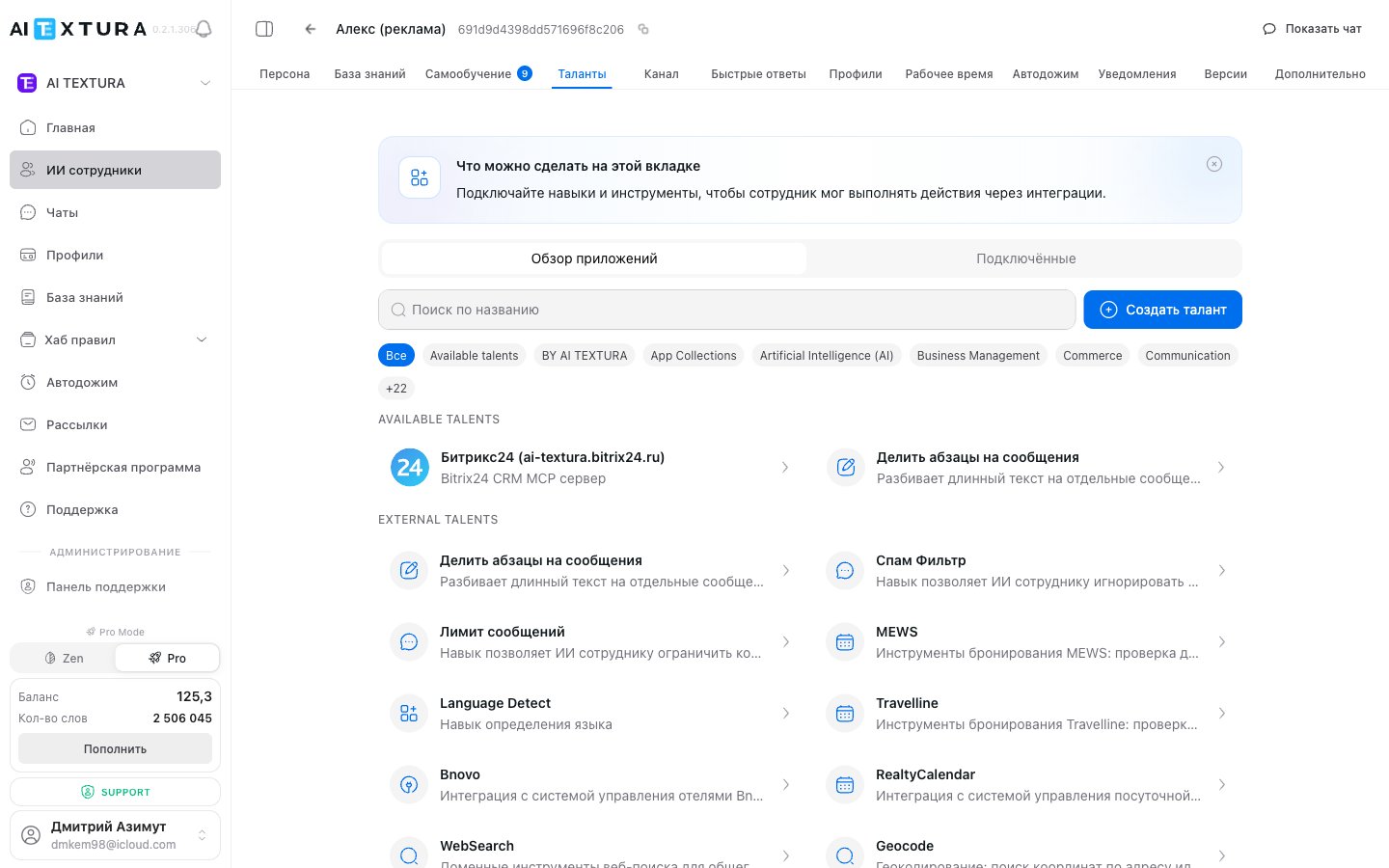
## Talents tab structure
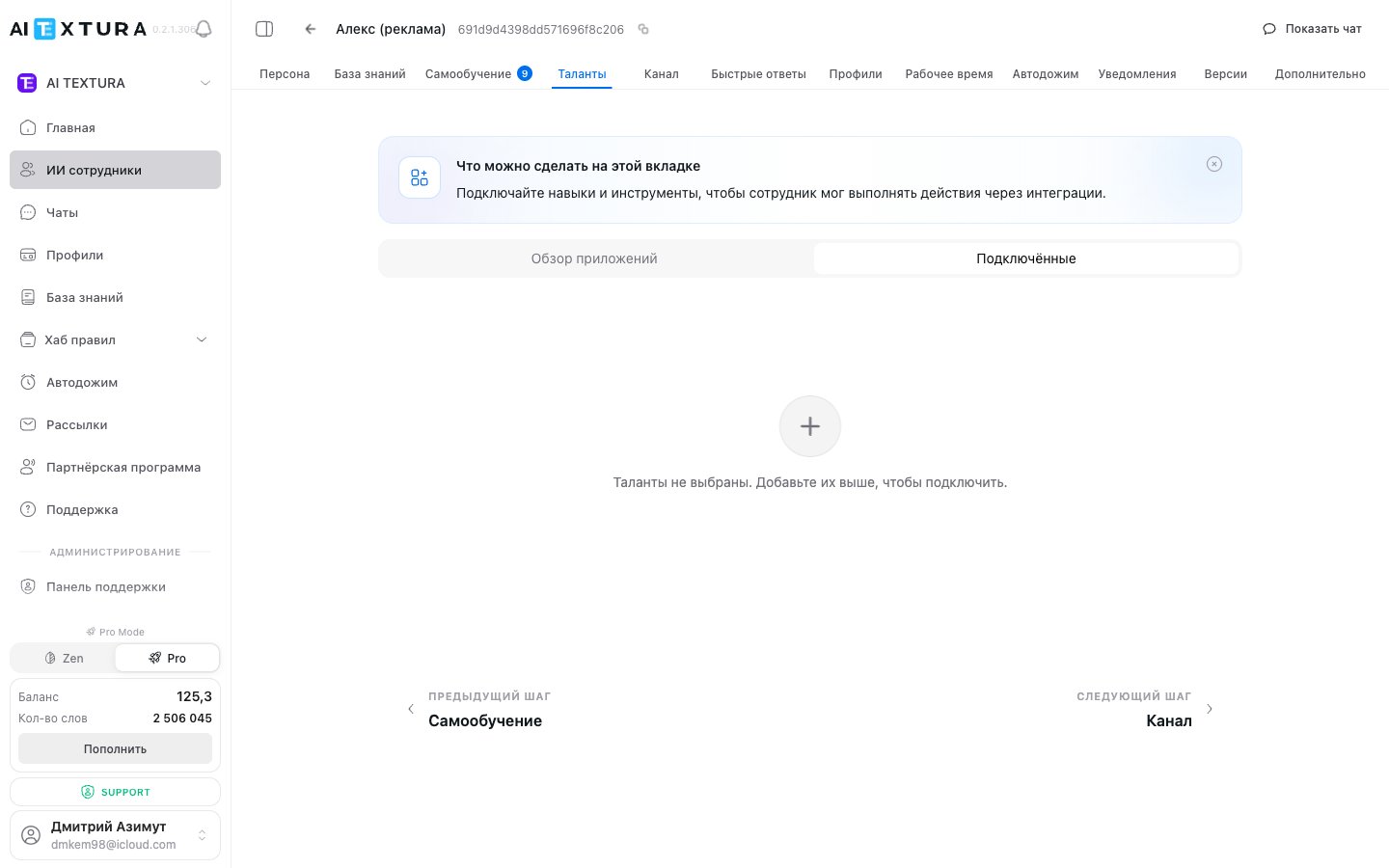
Open the AI employee and switch to the **Talents** tab.
| Sub-tab / button | Purpose |
| ------------------- | --------------------------------------------------------------- |
| **Browse apps** | Catalog of all 30+ available talents (with filters and search) |
| **Connected** | List of talents already added to the employee |
| **+ Create talent** | Connect **your own** MCP server by URL (custom MCP — see below) |
### Category filters
The catalog offers filters: **All**, **BY AI TEXTURA**, **App Collections**, **Artificial Intelligence (AI)**, **Business Management**, **Commerce**, **Communication**, and 22 more categories.
***
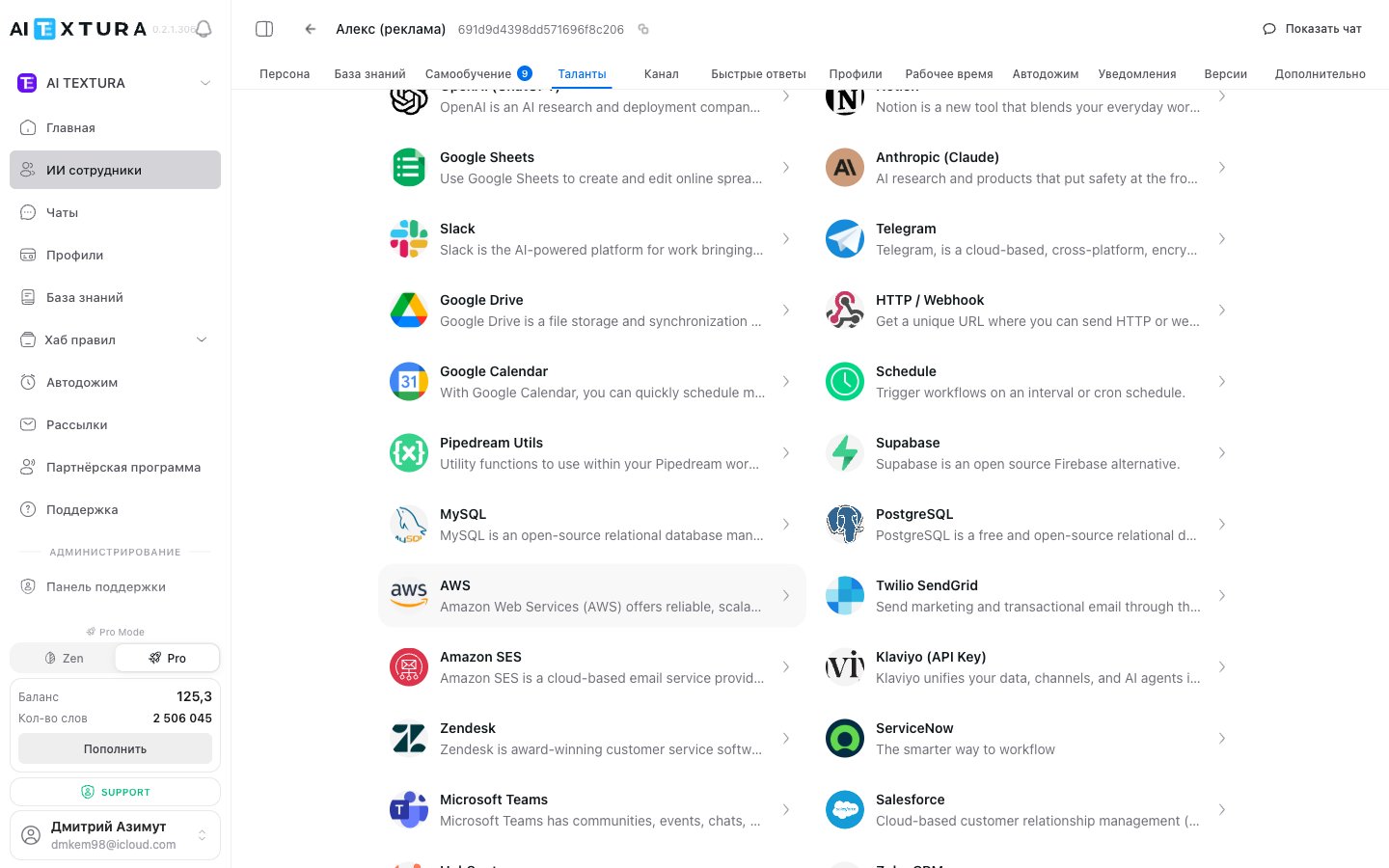
## Talent catalog (30+ integrations)
The catalog is organized into thematic groups. Each talent's card includes a connect button and a description of capabilities.
### AI TEXTURA-native
Built-in tools implemented by the AI TEXTURA team — they work without third-party accounts.
| Talent | Purpose |
| ---------------------------------- | ------------------------------------------------------------------ |
| **Split Paragraphs Into Messages** | Automatically splits long answers into multiple messenger messages |
| **Spam Filter** | Filters out spam and irrelevant messages before main processing |
| **Message Limit** | Caps the number of messages per client/day |
| **Language Detect** | Detects the language of the incoming message |
| **WebSearch** | Real-time web search for up-to-date information |
| **Geocode** | Converts addresses to coordinates and back |
| **Currency Exchange Rates** | Currency exchange rates |
### PMS / hotels
Property management systems for hotels. Details in [FAQ — PMS integrations](/en/faq/pms-integrations).
| Talent | Region / specifics |
| ------------------- | ------------------------------------------------------------------------------------------------------------------------------------------------------------------------ |
| **MEWS** | Global PMS. Fields: Configuration ID, Client Name, Hotel ID, Age Category Adult/Children, Hotel Timezone, Connector Client Token / Access Token / Client / Enterprise ID |
| **Travelline** | Hotel ID + Region (RU/BY/Worldwide) |
| **Bnovo** | Hotel ID, Login, Password |
| **RealtyCalendar** | PMS for apartments and hotels |
| **Bronirui Online** | PMS focused on the Russian market |
| **MeHotel** | PMS for small hotels and guesthouses |
### CRM
| Talent | Connection specifics |
| ------------------- | --------------------------------------------------------------------------------------------------------------------------------------------- |
| **Bitrix24** | Connect via an **already connected channel** or via an **inbound webhook**. See [the dedicated section below](#bitrix24-two-connection-paths) |
| **amoCRM** | OAuth connection (New connection / Existing account) |
| **Kommo** | Same as amoCRM, OAuth |
| **Salesforce** | OAuth |
| **HubSpot** | API key |
| **Zoho CRM** | OAuth |
| **Zendesk** | API key |
| **ServiceNow** | API key |
| **Microsoft Teams** | OAuth |
### AI / LLM
Connect external AI services as tools (for example, image generation or specialized answers).
| Talent | Connection |
| ---------------------- | -------------- |
| **OpenAI (ChatGPT)** | API key |
| **Anthropic (Claude)** | API key |
| **Azure OpenAI** | Endpoint + key |
### Communication / Utility
| Talent | Purpose |
| -------------------------- | ---------------------------------------------------------------------------------------- |
| **Slack** | Send messages to Slack channels |
| **Telegram** (as a talent) | Separate from the Telegram channel: used for service messages and notifications |
| **Schedule** | Scheduler for delayed actions |
| **Pipedream Utils** | Set of utility functions from Pipedream |
| **HTTP / Webhook** | Universal talent for sending HTTP requests to any URL — effectively, a bridge to any API |
### Documents / Storage
| Talent | Purpose |
| ------------------- | ------------------------------------------ |
| **Notion** | Read and write Notion pages and databases |
| **Google Sheets** | Read and write data in Google spreadsheets |
| **Google Drive** | Work with files in cloud storage |
| **Google Calendar** | Manage events and schedules |
### Databases and cloud
| Talent | Purpose |
| -------------- | ---------------------------------- |
| **Supabase** | Postgres database with REST API |
| **MySQL** | Direct MySQL connection |
| **PostgreSQL** | Direct PostgreSQL connection |
| **MongoDB** | NoSQL database |
| **Snowflake** | Enterprise-grade data warehouse |
| **AWS** | Amazon services (S3, Lambda, etc.) |
### E-commerce / Payments / Email
| Talent | Purpose |
| ------------------- | ----------------------------------------------- |
| **Stripe** | Payments: create links, check payments, refunds |
| **WooCommerce** | WordPress storefront |
| **Twilio SendGrid** | Transactional email |
| **Amazon SES** | Email via Amazon SES |
| **Klaviyo** | Marketing email (API key) |
### Social
| Talent | Purpose |
| ------------- | ------------------------- |
| **Pinterest** | Work with pins and boards |
The catalog is constantly expanding. If your service isn't there — use the universal **HTTP / Webhook** talent or connect [your own MCP server](#creating-a-custom-mcp-talent).
***
## Bitrix24 — two connection paths
In the platform, Bitrix24 appears **twice** — as a talent and as a channel ([/en/channels/bittrix24](/en/channels/bittrix24)). These are **two independent connections**:
| Type | Where | Why |
| ----------- | ---------------------------------------------------- | -------------------------------------------------------------------------------------------------------------- |
| **Channel** | [Channel](/en/channels/bittrix24) — REST webhook URL | Receive messages from Bitrix24 Open Lines into AI TEXTURA chats |
| **Talent** | Talents → Bitrix24 | Perform CRM operations from the agent's reply: create leads and deals, find contacts, set tasks, assign owners |
They **can (and often should) be connected at the same time**: the channel — to receive messages, the talent — to perform CRM actions in response.
### Connecting the Bitrix24 talent
Click the `Bitrix24` card in the talents catalog. The modal has two tabs:
"Use the authorization of an already connected Bitrix24 channel. The simplest way."
1. Pick the connected channel from the dropdown.
2. Click **Next** — the talent inherits the channel's permissions.
Create a separate inbound webhook in Bitrix24. Useful when no channel is in use, or when you need an isolated permission set.
`Apps → Developers → Other → Inbound webhook`
Check all required scopes:
* **CRM** (`crm`)
* **Users** (`user`)
* **Tasks** (`task`)
* **Chat and notifications** (`im`)
* **Chatbot creation and management** (`imbot`)
* **Open Lines** (`imopenlines`)
Bitrix24 will show a webhook URL like `https://your-portal.bitrix24.com/rest/1/abcdef0123456/`.
Return to the Bitrix24 talent modal and paste the URL into the field. Click **Connect**.
If you've already connected the [Bitrix24 channel](/en/channels/bittrix24) — pick the **Connected channel** tab, it saves a few steps. The webhook option is for when no channel is used or the channel's permissions aren't enough.
***
## How to connect any talent
Go to the AI employee's card and open the **Talents** tab.
On the **Browse apps** tab, use the search bar, category filters, or just scroll through the catalog.
Click the card — a connection modal opens with fields specific to that service.
* **Instance name** — pick a clear name (for example, "Booking — Seaside Hotel").
* **Configuration** — fill in the service's fields (Hotel ID, keys, region, OAuth login, etc.).
Click **Connect talent**. It will appear on the **Connected** tab.
If the connection requires OAuth (Google, amoCRM, Kommo, Salesforce, etc.), the system redirects you to the service's login page. Sign in with an account that has the right permissions.
***
## Multiple instances of the same talent
You can connect **the same talent multiple times** with different settings. Useful when:
* You have **multiple hotels** — a separate Travelline / Bnovo / MEWS instance per Hotel ID
* You have **multiple staff members** — each with their own Google Calendar
* You need **different configurations** of the same service — for example, two MySQL instances for different databases
Give each instance a clear name so both you and the agent can tell them apart: "Booking — Seaside Hotel" / "Booking — Mountain Hotel".
***
## Creating a custom talent (Custom MCP)
If the catalog doesn't have the integration you need — connect **your own MCP server**. AI TEXTURA supports the **Model Context Protocol (MCP)**: any compliant server can be connected as a talent.
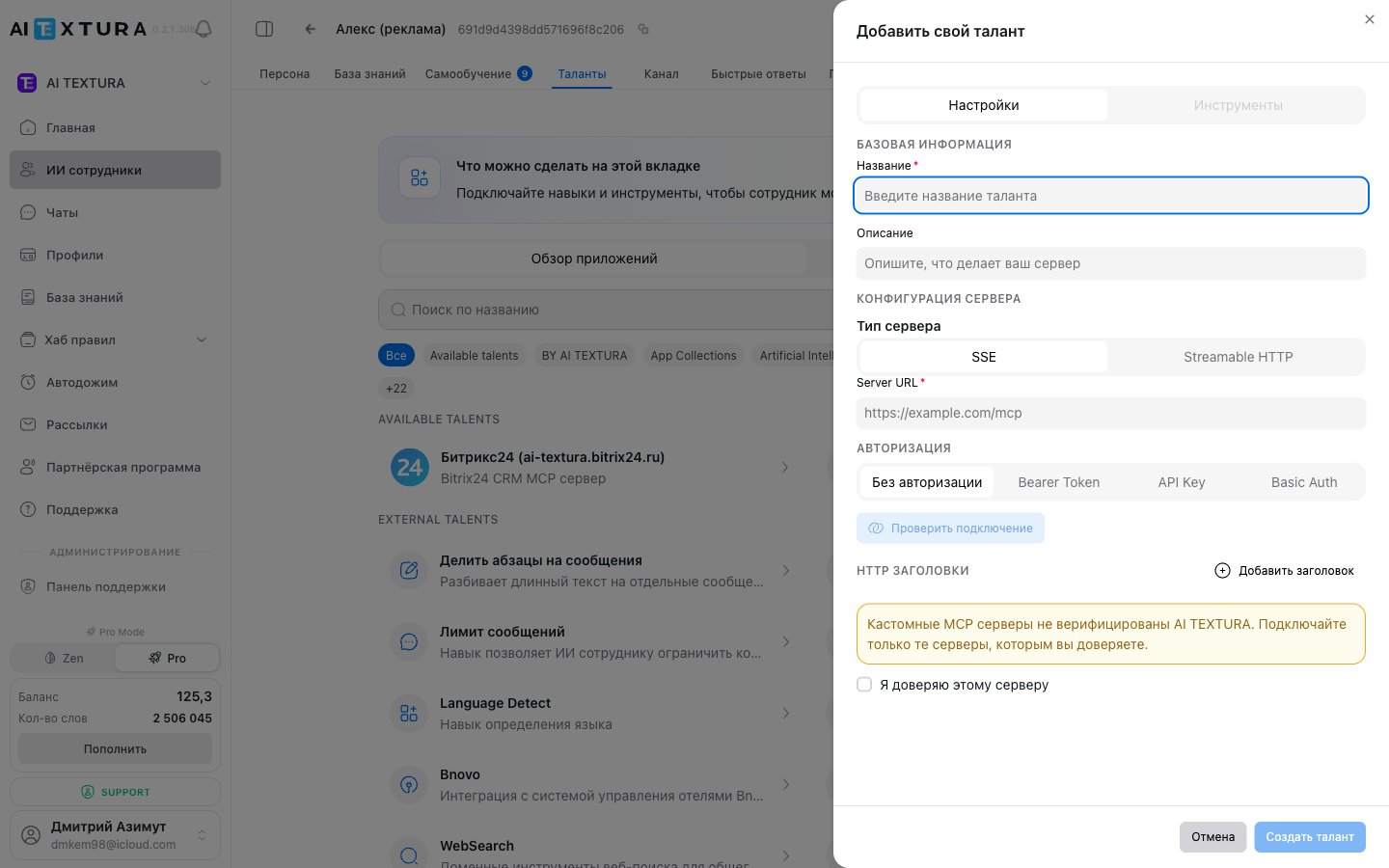
### "Create talent" form parameters
| Field | Description |
| ------------------------- | ------------------------------------------------------------------------------------------------- |
| **Server type** | **SSE** (Server-Sent Events) or **Streamable HTTP** — depends on your MCP server's implementation |
| **Server URL** | Address of your MCP server (HTTPS required) |
| **Authorization** | One of: **None** / **Bearer Token** / **API Key** / **Basic Auth** |
| **HTTP headers** | Arbitrary key-value pairs sent with each request (for example, `X-Tenant-Id: ...`) |
| **"I trust this server"** | Required checkbox — confirms the server is controlled by you or a trusted party |
### Authorization modes
| Mode | When to use |
| ---------------- | ------------------------------------------------------------------------------------------------- |
| **None** | The MCP server doesn't require authorization (for example, local development or internal network) |
| **Bearer Token** | Token sent in the `Authorization: Bearer ` header |
| **API Key** | Custom header name + key (for example, `X-API-Key: `) |
| **Basic Auth** | Login/password encoded in `Authorization: Basic ` |
**The "I trust this server" checkbox is required.** The platform warns you: connecting an unverified MCP server gives it the full conversation context with the client and delegates actions on the agent's behalf. Don't connect third-party servers you don't trust.
### Step-by-step custom MCP setup
Make sure your server implements MCP over SSE or Streamable HTTP, is accessible over HTTPS, and validates incoming requests.
The button is at the top of the **Talents** tab.
**SSE** or **Streamable HTTP** — to match your implementation.
Enter the Server URL, choose an authorization mode, and fill in the relevant fields.
If your server needs custom HTTP headers, add them as key-value pairs.
Tick **"I trust this server"** and click **Save**. The talent appears in the catalog.
Custom MCP fits internal company systems (in-house CRM, ERP, billing) and bespoke logic that ready-made talents don't cover. For simple HTTP requests, the built-in **HTTP / Webhook** talent is easier.
***
## Connection to the Persona — critical
Connecting a talent is only half the work. **The other half is describing it in the agent's [Persona](/en/guides/persona).** Without that, the agent may not know when to use the talent — or "forget" about it entirely.
In the [Persona](/en/guides/persona) section, write specific instructions for each connected talent:
> When a guest asks about room availability for specific dates — use Travelline to check. Show available options with prices.
> When a client is ready to place an order — create a deal in Bitrix24 via the talent, fill in "Name", "Phone", and "Amount" from the conversation context.
> When a client asks for an invoice — create a Stripe payment link and send it to the client.
The more precise the description in the Persona, the more appropriately the agent uses the talent.
***
## Real-world examples
The hotel connected the **Travelline** talent. When a guest asks about room availability, the employee independently checks the PMS and offers booking options.
**Connected:** Travelline (Hotel ID, region).
**In the Persona:** when asked about rooms — check Travelline, show options with prices, and on confirmation create a booking.
A school connected **Google Calendar** to its tutor employee. Student: "I'd like a consultation on Thursday" — the employee checks slots and creates an event.
Messages from Bitrix24 Open Lines flow into AI TEXTURA chats via the [Bitrix24 channel](/en/channels/bittrix24). At the same time, via the **Bitrix24 talent**, the employee automatically creates a lead/deal and assigns a manager.
**Channel:** REST webhook URL from Open Lines.
**Talent:** inbound webhook with `crm`, `user`, `task`, `im`, `imbot`, `imopenlines` permissions.
A store connected **Stripe** (payment links) and **Twilio SendGrid** (sending receipts/notifications by email).
The company's internal billing is exposed via MCP at `https://internal.example.com/mcp` with a Bearer Token. Connected as a custom talent with "I trust this server" enabled. The agent pulls a client's subscription data and helps with renewals.
***
## Things to watch
Hotel ID, access keys, region, OAuth accounts — gather everything before connecting.
After connecting, open `Show chat` and run the scenario where the employee should use the talent.
OAuth tokens can expire; CRM webhooks can be revoked. Check the **Connected** tab.
Message comes in — that's a channel. Employee performs an action — that's a talent. Don't connect a talent where you need a channel, and vice versa.
Without a clear instruction in the Persona, the employee may not use the talent. Spell out specific situations.
***
## FAQ
A channel is a source of incoming messages (Telegram, Wazzup, Bitrix24 channel). A talent is an action tool the employee invokes from a reply (create a CRM deal, check a PMS room, send an email). Bitrix24 and amoCRM appear in both — those are **two separate connections**: the channel for the conversation, the talent for CRM operations. Details in [Channels](/en/channels/index) and [Bitrix24](/en/channels/bittrix24).
Model Context Protocol — an open standard for describing tools to language models. Most modern AI tools (including the AI TEXTURA catalog) are implemented as MCP servers. This makes it possible to connect **your own** servers via the same protocol — see [Creating a custom talent](#creating-a-custom-mcp-talent).
There are no technical limits. But the more talents, the more important it is to spell out clearly in the [Persona](/en/guides/persona) when each one should be used.
Yes. Useful for multiple instances with different settings — for example, two Travelline instances for two hotels.
Most likely there's no instruction in the [Persona](/en/guides/persona). Add a rule: "When a client asks about \[situation] — use \[talent name]." Then test through `Show chat`.
The employee tells the client they can't perform the action and offers an alternative. The employee itself keeps working — just without that specific talent.
Yes. Use **+ Create talent** to connect your own MCP server, or the universal **HTTP / Webhook** talent for arbitrary HTTP requests.
Connect only servers you trust. Through MCP, the server receives the conversation context and can act on the agent's behalf. The **"I trust this server"** checkbox is required — it's an explicit acknowledgment of responsibility.
The channel is needed so messages from Bitrix24 Open Lines reach AI TEXTURA chats. The talent is needed so the employee can run CRM operations (create leads, deals, tasks) in response. They're two different layers of integration — and you usually need both.
In the dashboard of the corresponding PMS. Details for specific systems are in [FAQ — PMS integrations](/en/faq/pms-integrations). For AI TEXTURA-specific questions, contact [Support](/en/guides/support).
Some talents are included in your plan. Some integrations require a subscription to a third-party service (Google Workspace, Notion, Stripe, etc.) — those are billed separately by the providers.
 ***
## Talent catalog (30+ integrations)
The catalog is organized into thematic groups. Each talent's card includes a connect button and a description of capabilities.
### AI TEXTURA-native
Built-in tools implemented by the AI TEXTURA team — they work without third-party accounts.
| Talent | Purpose |
| ---------------------------------- | ------------------------------------------------------------------ |
| **Split Paragraphs Into Messages** | Automatically splits long answers into multiple messenger messages |
| **Spam Filter** | Filters out spam and irrelevant messages before main processing |
| **Message Limit** | Caps the number of messages per client/day |
| **Language Detect** | Detects the language of the incoming message |
| **WebSearch** | Real-time web search for up-to-date information |
| **Geocode** | Converts addresses to coordinates and back |
| **Currency Exchange Rates** | Currency exchange rates |
### PMS / hotels
Property management systems for hotels. Details in [FAQ — PMS integrations](/en/faq/pms-integrations).
| Talent | Region / specifics |
| ------------------- | ------------------------------------------------------------------------------------------------------------------------------------------------------------------------ |
| **MEWS** | Global PMS. Fields: Configuration ID, Client Name, Hotel ID, Age Category Adult/Children, Hotel Timezone, Connector Client Token / Access Token / Client / Enterprise ID |
| **Travelline** | Hotel ID + Region (RU/BY/Worldwide) |
| **Bnovo** | Hotel ID, Login, Password |
| **RealtyCalendar** | PMS for apartments and hotels |
| **Bronirui Online** | PMS focused on the Russian market |
| **MeHotel** | PMS for small hotels and guesthouses |
### CRM
| Talent | Connection specifics |
| ------------------- | --------------------------------------------------------------------------------------------------------------------------------------------- |
| **Bitrix24** | Connect via an **already connected channel** or via an **inbound webhook**. See [the dedicated section below](#bitrix24-two-connection-paths) |
| **amoCRM** | OAuth connection (New connection / Existing account) |
| **Kommo** | Same as amoCRM, OAuth |
| **Salesforce** | OAuth |
| **HubSpot** | API key |
| **Zoho CRM** | OAuth |
| **Zendesk** | API key |
| **ServiceNow** | API key |
| **Microsoft Teams** | OAuth |
### AI / LLM
Connect external AI services as tools (for example, image generation or specialized answers).
| Talent | Connection |
| ---------------------- | -------------- |
| **OpenAI (ChatGPT)** | API key |
| **Anthropic (Claude)** | API key |
| **Azure OpenAI** | Endpoint + key |
### Communication / Utility
| Talent | Purpose |
| -------------------------- | ---------------------------------------------------------------------------------------- |
| **Slack** | Send messages to Slack channels |
| **Telegram** (as a talent) | Separate from the Telegram channel: used for service messages and notifications |
| **Schedule** | Scheduler for delayed actions |
| **Pipedream Utils** | Set of utility functions from Pipedream |
| **HTTP / Webhook** | Universal talent for sending HTTP requests to any URL — effectively, a bridge to any API |
### Documents / Storage
| Talent | Purpose |
| ------------------- | ------------------------------------------ |
| **Notion** | Read and write Notion pages and databases |
| **Google Sheets** | Read and write data in Google spreadsheets |
| **Google Drive** | Work with files in cloud storage |
| **Google Calendar** | Manage events and schedules |
### Databases and cloud
| Talent | Purpose |
| -------------- | ---------------------------------- |
| **Supabase** | Postgres database with REST API |
| **MySQL** | Direct MySQL connection |
| **PostgreSQL** | Direct PostgreSQL connection |
| **MongoDB** | NoSQL database |
| **Snowflake** | Enterprise-grade data warehouse |
| **AWS** | Amazon services (S3, Lambda, etc.) |
### E-commerce / Payments / Email
| Talent | Purpose |
| ------------------- | ----------------------------------------------- |
| **Stripe** | Payments: create links, check payments, refunds |
| **WooCommerce** | WordPress storefront |
| **Twilio SendGrid** | Transactional email |
| **Amazon SES** | Email via Amazon SES |
| **Klaviyo** | Marketing email (API key) |
### Social
| Talent | Purpose |
| ------------- | ------------------------- |
| **Pinterest** | Work with pins and boards |
***
## Talent catalog (30+ integrations)
The catalog is organized into thematic groups. Each talent's card includes a connect button and a description of capabilities.
### AI TEXTURA-native
Built-in tools implemented by the AI TEXTURA team — they work without third-party accounts.
| Talent | Purpose |
| ---------------------------------- | ------------------------------------------------------------------ |
| **Split Paragraphs Into Messages** | Automatically splits long answers into multiple messenger messages |
| **Spam Filter** | Filters out spam and irrelevant messages before main processing |
| **Message Limit** | Caps the number of messages per client/day |
| **Language Detect** | Detects the language of the incoming message |
| **WebSearch** | Real-time web search for up-to-date information |
| **Geocode** | Converts addresses to coordinates and back |
| **Currency Exchange Rates** | Currency exchange rates |
### PMS / hotels
Property management systems for hotels. Details in [FAQ — PMS integrations](/en/faq/pms-integrations).
| Talent | Region / specifics |
| ------------------- | ------------------------------------------------------------------------------------------------------------------------------------------------------------------------ |
| **MEWS** | Global PMS. Fields: Configuration ID, Client Name, Hotel ID, Age Category Adult/Children, Hotel Timezone, Connector Client Token / Access Token / Client / Enterprise ID |
| **Travelline** | Hotel ID + Region (RU/BY/Worldwide) |
| **Bnovo** | Hotel ID, Login, Password |
| **RealtyCalendar** | PMS for apartments and hotels |
| **Bronirui Online** | PMS focused on the Russian market |
| **MeHotel** | PMS for small hotels and guesthouses |
### CRM
| Talent | Connection specifics |
| ------------------- | --------------------------------------------------------------------------------------------------------------------------------------------- |
| **Bitrix24** | Connect via an **already connected channel** or via an **inbound webhook**. See [the dedicated section below](#bitrix24-two-connection-paths) |
| **amoCRM** | OAuth connection (New connection / Existing account) |
| **Kommo** | Same as amoCRM, OAuth |
| **Salesforce** | OAuth |
| **HubSpot** | API key |
| **Zoho CRM** | OAuth |
| **Zendesk** | API key |
| **ServiceNow** | API key |
| **Microsoft Teams** | OAuth |
### AI / LLM
Connect external AI services as tools (for example, image generation or specialized answers).
| Talent | Connection |
| ---------------------- | -------------- |
| **OpenAI (ChatGPT)** | API key |
| **Anthropic (Claude)** | API key |
| **Azure OpenAI** | Endpoint + key |
### Communication / Utility
| Talent | Purpose |
| -------------------------- | ---------------------------------------------------------------------------------------- |
| **Slack** | Send messages to Slack channels |
| **Telegram** (as a talent) | Separate from the Telegram channel: used for service messages and notifications |
| **Schedule** | Scheduler for delayed actions |
| **Pipedream Utils** | Set of utility functions from Pipedream |
| **HTTP / Webhook** | Universal talent for sending HTTP requests to any URL — effectively, a bridge to any API |
### Documents / Storage
| Talent | Purpose |
| ------------------- | ------------------------------------------ |
| **Notion** | Read and write Notion pages and databases |
| **Google Sheets** | Read and write data in Google spreadsheets |
| **Google Drive** | Work with files in cloud storage |
| **Google Calendar** | Manage events and schedules |
### Databases and cloud
| Talent | Purpose |
| -------------- | ---------------------------------- |
| **Supabase** | Postgres database with REST API |
| **MySQL** | Direct MySQL connection |
| **PostgreSQL** | Direct PostgreSQL connection |
| **MongoDB** | NoSQL database |
| **Snowflake** | Enterprise-grade data warehouse |
| **AWS** | Amazon services (S3, Lambda, etc.) |
### E-commerce / Payments / Email
| Talent | Purpose |
| ------------------- | ----------------------------------------------- |
| **Stripe** | Payments: create links, check payments, refunds |
| **WooCommerce** | WordPress storefront |
| **Twilio SendGrid** | Transactional email |
| **Amazon SES** | Email via Amazon SES |
| **Klaviyo** | Marketing email (API key) |
### Social
| Talent | Purpose |
| ------------- | ------------------------- |
| **Pinterest** | Work with pins and boards |
 ### "Create talent" form parameters
| Field | Description |
| ------------------------- | ------------------------------------------------------------------------------------------------- |
| **Server type** | **SSE** (Server-Sent Events) or **Streamable HTTP** — depends on your MCP server's implementation |
| **Server URL** | Address of your MCP server (HTTPS required) |
| **Authorization** | One of: **None** / **Bearer Token** / **API Key** / **Basic Auth** |
| **HTTP headers** | Arbitrary key-value pairs sent with each request (for example, `X-Tenant-Id: ...`) |
| **"I trust this server"** | Required checkbox — confirms the server is controlled by you or a trusted party |
### Authorization modes
| Mode | When to use |
| ---------------- | ------------------------------------------------------------------------------------------------- |
| **None** | The MCP server doesn't require authorization (for example, local development or internal network) |
| **Bearer Token** | Token sent in the `Authorization: Bearer
### "Create talent" form parameters
| Field | Description |
| ------------------------- | ------------------------------------------------------------------------------------------------- |
| **Server type** | **SSE** (Server-Sent Events) or **Streamable HTTP** — depends on your MCP server's implementation |
| **Server URL** | Address of your MCP server (HTTPS required) |
| **Authorization** | One of: **None** / **Bearer Token** / **API Key** / **Basic Auth** |
| **HTTP headers** | Arbitrary key-value pairs sent with each request (for example, `X-Tenant-Id: ...`) |
| **"I trust this server"** | Required checkbox — confirms the server is controlled by you or a trusted party |
### Authorization modes
| Mode | When to use |
| ---------------- | ------------------------------------------------------------------------------------------------- |
| **None** | The MCP server doesn't require authorization (for example, local development or internal network) |
| **Bearer Token** | Token sent in the `Authorization: Bearer