> ## Documentation Index
> Fetch the complete documentation index at: https://aitextura.mintlify.site/llms.txt
> Use this file to discover all available pages before exploring further.
# Referral Program
> AI Textura referral program: unique code and link, automatic tracking, rewards for every invited user.
The Referral Program is AI Textura's built-in system that lets you invite new users to the platform and earn rewards for each one. The program works automatically — all you need to do is share your link or code.
 Balance and usage history
Account parameters
Contact the AI Textura team
Overall platform analytics
***
## Referral Code and Link
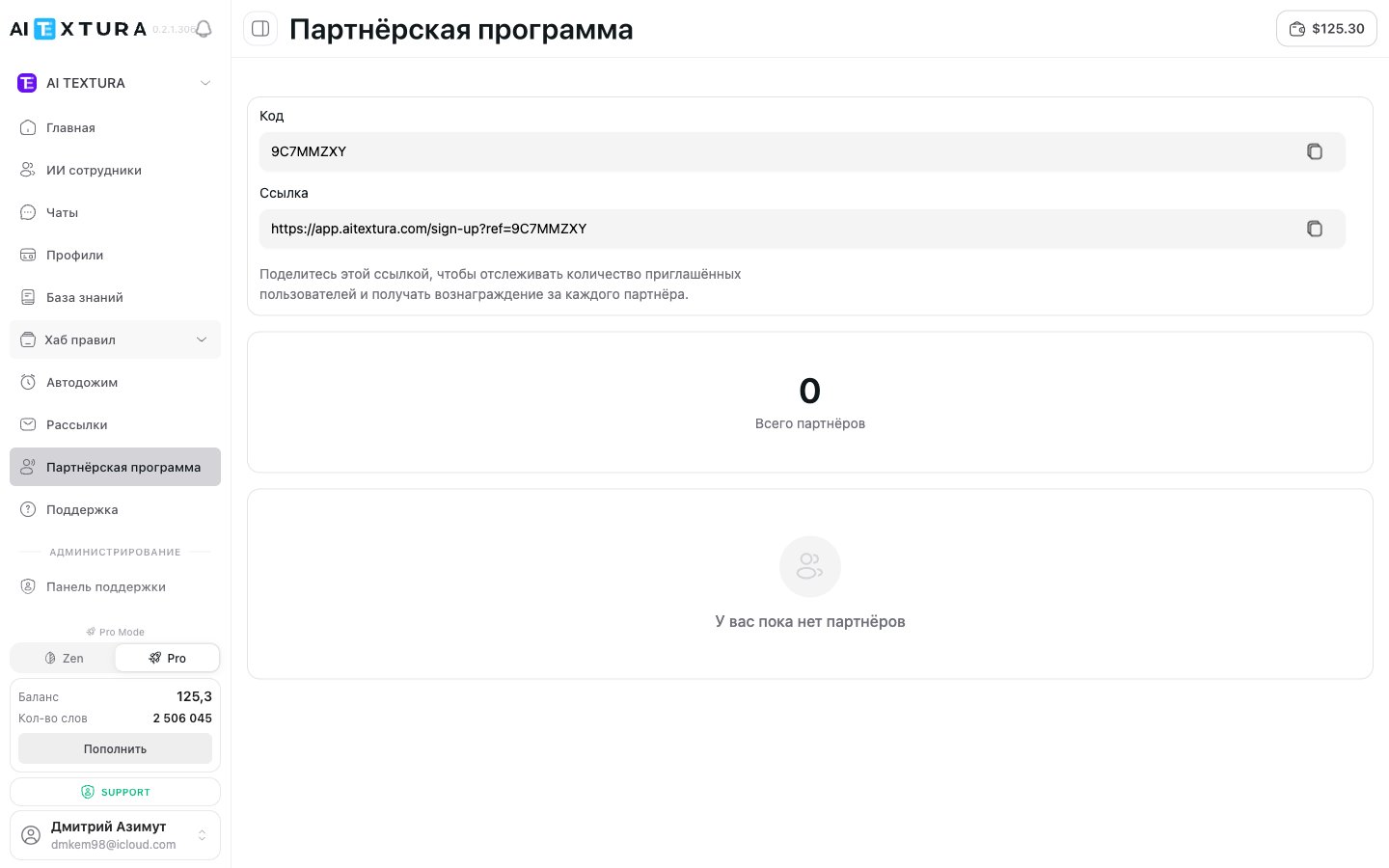
When you create an account, you are automatically assigned a unique referral code and link. They remain unchanged permanently.
| Element | What it is | Example |
| -------- | ------------------------------------------- | ------------------------------------------------ |
| **Code** | Unique referral code tied to your account | `9C7MMZXY` |
| **Link** | Ready-made registration link with your code | `https://app.aitextura.com/sign-up?ref=9C7MMZXY` |
Both fields can be copied with a single click in the **Referral Program** section in the left menu.
It is more convenient to share the link — it leads directly to the registration page with the referral code pre-filled. The new user does not need to enter anything manually.
***
## How the Referral System Works
Send the link to a colleague, post it on social media, add it to your email signature — any method works.
They follow your link or enter the code during registration and create an AI Textura account.
The platform automatically links the new user to your account as a referral.
You earn a bonus for each invited partner. Reward details can be checked with the support team.
***
## Partner Counter
The **Referral Program** page displays the **Total Partners** block — it shows how many users have registered using your link or code. The counter updates automatically and only counts completed registrations.
If a user clicks the link but does not create an account, they are not counted.
***
## Two Ways to Invite
### Method 1: Referral Link
Copy the link and send it any way you prefer. The referral code is applied automatically when the recipient opens the link.
### Method 2: Referral Code
Share the code verbally or in a message. The new user enters it manually during registration.
When using the code, the user may forget to enter it or make a typo. The link is more reliable.
***
## Where and How to Share Your Link
The referral program works best when you reach the right audience. Proven methods include:
* **Recommend to colleagues** — a personal recommendation is more effective than any ad.
* **Professional chats and groups** — Telegram chats about automation, business, marketing.
* **Email signature** — subtle and works in the background.
* **Blog post or case study on social media** — share how AI Textura helps your business.
* **Educational content** — webinars, consultations, training sessions.
Share your link honestly and mention that it is a referral program. Transparency builds trust.
***
## Key Details
* The referral program is **active by default** for all users — no setup required.
* There is **no limit on the number of referrals** — invite as many users as you want.
* The program works **without geographic restrictions**.
* Your code and link **never change** — they are tied to your account permanently.
***
## FAQ
Open **Referral Program** in the left menu. The page displays the **Code** and **Link** fields — both can be copied.
No, the code is generated automatically and tied to your account. It cannot be changed.
The referral code is passed through the link when the registration page loads. If the user closes the page and returns later without the link, the referral may not be tracked. It is best to register immediately.
Make sure the user followed your link or entered your code. If everything was done correctly but the counter did not update, create a ticket in the [Support](/en/guides/support) section.
No. The referral program is active by default for all users.
Balance and usage history
Account parameters
Contact the AI Textura team
Overall platform analytics
***
## Referral Code and Link
When you create an account, you are automatically assigned a unique referral code and link. They remain unchanged permanently.
| Element | What it is | Example |
| -------- | ------------------------------------------- | ------------------------------------------------ |
| **Code** | Unique referral code tied to your account | `9C7MMZXY` |
| **Link** | Ready-made registration link with your code | `https://app.aitextura.com/sign-up?ref=9C7MMZXY` |
Both fields can be copied with a single click in the **Referral Program** section in the left menu.
It is more convenient to share the link — it leads directly to the registration page with the referral code pre-filled. The new user does not need to enter anything manually.
***
## How the Referral System Works
Send the link to a colleague, post it on social media, add it to your email signature — any method works.
They follow your link or enter the code during registration and create an AI Textura account.
The platform automatically links the new user to your account as a referral.
You earn a bonus for each invited partner. Reward details can be checked with the support team.
***
## Partner Counter
The **Referral Program** page displays the **Total Partners** block — it shows how many users have registered using your link or code. The counter updates automatically and only counts completed registrations.
If a user clicks the link but does not create an account, they are not counted.
***
## Two Ways to Invite
### Method 1: Referral Link
Copy the link and send it any way you prefer. The referral code is applied automatically when the recipient opens the link.
### Method 2: Referral Code
Share the code verbally or in a message. The new user enters it manually during registration.
When using the code, the user may forget to enter it or make a typo. The link is more reliable.
***
## Where and How to Share Your Link
The referral program works best when you reach the right audience. Proven methods include:
* **Recommend to colleagues** — a personal recommendation is more effective than any ad.
* **Professional chats and groups** — Telegram chats about automation, business, marketing.
* **Email signature** — subtle and works in the background.
* **Blog post or case study on social media** — share how AI Textura helps your business.
* **Educational content** — webinars, consultations, training sessions.
Share your link honestly and mention that it is a referral program. Transparency builds trust.
***
## Key Details
* The referral program is **active by default** for all users — no setup required.
* There is **no limit on the number of referrals** — invite as many users as you want.
* The program works **without geographic restrictions**.
* Your code and link **never change** — they are tied to your account permanently.
***
## FAQ
Open **Referral Program** in the left menu. The page displays the **Code** and **Link** fields — both can be copied.
No, the code is generated automatically and tied to your account. It cannot be changed.
The referral code is passed through the link when the registration page loads. If the user closes the page and returns later without the link, the referral may not be tracked. It is best to register immediately.
Make sure the user followed your link or entered your code. If everything was done correctly but the counter did not update, create a ticket in the [Support](/en/guides/support) section.
No. The referral program is active by default for all users.