> ## Documentation Index
> Fetch the complete documentation index at: https://aitextura.mintlify.site/llms.txt
> Use this file to discover all available pages before exploring further.
# WhatsApp, VK, Instagram, Avito and Other Messengers
> Connect popular messengers and marketplaces (WhatsApp, VK, Instagram, Avito, Viber, Facebook) to your AI employee through aggregator platforms: Wazzup, Umnico, Kommo, Salebot, SendAPI, Jivo, HelpDeskEddy.
 What a channel is and how it works in AI Textura
Direct connection of a Telegram bot
CRMs with built-in messengers
Bitrix24 open channels
To let your AI employee respond to customers on WhatsApp, VK, Instagram, Avito, and other channels, use an **aggregator platform**. An aggregator combines several messengers in one window and provides a single API key for connecting to AI Textura.
**WhatsApp** in AI Textura is connected **only** through aggregators — the most reliable option is **Wazzup**. There is no direct WhatsApp channel on the platform.
***
## Supported platforms
| Platform | Type | WhatsApp | VK | Instagram | Avito | Viber | Telegram | Other |
| ---------------- | --------------------------- | -------- | -- | --------- | ----- | ----- | -------- | ---------------------- |
| **Wazzup** | Aggregator (WhatsApp focus) | + | - | + | + | - | + | — |
| **Umnico** | Universal aggregator | + | + | + | + | + | + | Facebook, Skype |
| **Kommo** | CRM with built-in channels | + | + | + | - | - | + | via Kommo integrations |
| **Salebot** | Bot builder | + | + | - | - | + | + | — |
| **SendAPI** | Universal API | + | + | + | + | + | + | any HTTP channel |
| **Jivo** | Live chat + omnichannel | + | + | + | - | - | + | website widget, email |
| **HelpDeskEddy** | Helpdesk platform | + | - | + | - | - | + | tickets, email |
If your main goal is WhatsApp without a CRM, start with **Wazzup**. If you need a single dashboard for 5+ messengers, go with **Umnico** or **SendAPI**.
***
## Platform overview
Wazzup specializes in WhatsApp connections (personal number and Business API). It also supports Instagram, Avito, and Telegram. Simple setup and a stable connection.
**Supported channels:** WhatsApp (personal and Business API), Instagram, Avito, Telegram.
Umnico combines WhatsApp, Telegram, Instagram, VK, Viber, Facebook, Avito, and other channels in one window. A good fit for companies that need to connect multiple messengers without a CRM.
**Supported channels:** WhatsApp, Telegram, Instagram, VK, Viber, Facebook, Avito, and more.
Kommo (the international version of amoCRM) is a CRM with native messenger integrations. If you already use Kommo for sales, connecting channels is as simple as it gets.
**Supported channels:** WhatsApp, Telegram, Instagram, VK.
Salebot is an automation platform with a visual bot builder. It lets you design conversation flows and connect messengers to AI Textura.
**Supported channels:** WhatsApp, Telegram, VK, Viber.
SendAPI provides a universal HTTP interface (webhooks) for connecting any channel. A good fit if you need a non-standard integration or a channel that other aggregators don't have.
**Supported channels:** any channel via HTTP webhooks.
Jivo offers a live-chat website widget plus a messenger aggregator. Convenient if you already run Jivo as a website live chat — the AI employee plugs into the same dashboard.
**Supported channels:** WhatsApp, VK, Instagram, Telegram, email, website widget.
HelpDeskEddy is a ticketing system with messenger support. A good fit for companies running support through tickets that want to add an AI employee as the first line.
**Supported channels:** WhatsApp, Instagram, Telegram, email, tickets.
***
## How to connect
The process is the same for every aggregator platform.
### Step 1. Set up the aggregator
Go to the website of your chosen aggregator (Wazzup, Umnico, Kommo, Salebot, SendAPI, Jivo, or HelpDeskEddy) and create an account.
In the aggregator's dashboard, add the channels you want to use: WhatsApp, VK, Instagram, Avito, Viber, and others.
Find the **API** or **Integrations** section in the aggregator settings and copy the API key (token).
Keep the API key secure — it grants full access to your channels in the aggregator. Do not share it with third parties.
### Step 2. Connect the aggregator in AI Textura
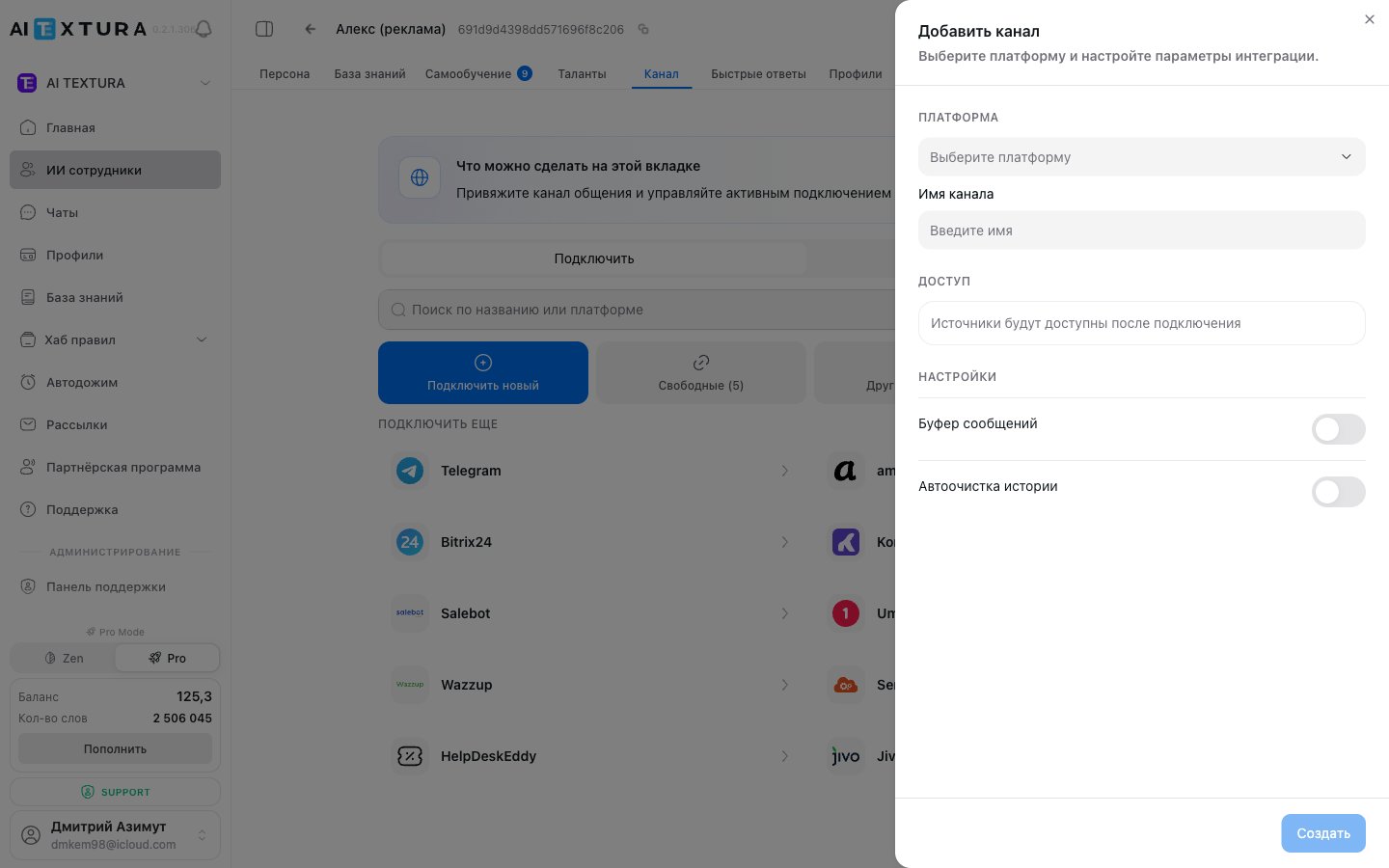
Go to [AI Employees](/en/guides/ai-employees) → select the agent → **Channel** tab → **Connect new** sub-tab.
In the platform list, find the one you need (e.g., Wazzup or Umnico) and click on it.
In the side panel, switch to the **Create** tab.
* **Channel name**: any convenient name (e.g., "WhatsApp via Wazzup").
* **API key**: paste the key copied from the aggregator.
Click **Connect**. The channel will appear in the **Connected** tab and start receiving messages.
For **Wazzup** and some other aggregators, after connecting you need to choose a specific source channel (e.g., the right WhatsApp number) from those available in the aggregator.
A single aggregator can serve several messengers at once — one API key is enough.
***
## Which aggregator to choose
The choice depends on your goals and the channels you want to connect.
| Scenario | Recommendation |
| -------------------------------------- | ---------------------------------------------------------------------------- |
| Primary channel is WhatsApp | **Wazzup** — stable WhatsApp connection, simple setup |
| Need multiple messengers without a CRM | **Umnico** — widest channel coverage in one window |
| Already using Kommo CRM | **Kommo** — messengers are built into the CRM, no separate aggregator needed |
| Need automation and bot scenarios | **Salebot** — visual builder + channel connections |
| You already have a website live chat | **Jivo** — widget + messengers in one dashboard |
| Support runs through tickets | **HelpDeskEddy** — embed AI as the first line |
| Custom integration or rare channel | **SendAPI** — universal API via webhooks |
If you need WhatsApp, Instagram, VK, Avito, or other messengers but don't use a CRM, an aggregator (Wazzup or Umnico) is the simplest solution.
***
## FAQ
Yes. You can connect different channels through different aggregators to the same AI employee.
No. There is no direct WhatsApp channel in AI Textura. Use Wazzup, Umnico, Kommo, SendAPI, Jivo, or HelpDeskEddy — any of them supports WhatsApp.
The AI employee won't be able to send or receive messages through that channel until the aggregator is back. Messages sent during the outage will be processed once it recovers (depending on the aggregator).
Yes. Each aggregator is a separate service with its own pricing. The AI Textura subscription does not include the aggregator cost.
Currently there is no direct Avito channel in AI Textura. Avito connects through aggregators (Wazzup, Umnico, SendAPI) that support it.
What a channel is and how it works in AI Textura
Direct connection of a Telegram bot
CRMs with built-in messengers
Bitrix24 open channels
To let your AI employee respond to customers on WhatsApp, VK, Instagram, Avito, and other channels, use an **aggregator platform**. An aggregator combines several messengers in one window and provides a single API key for connecting to AI Textura.
**WhatsApp** in AI Textura is connected **only** through aggregators — the most reliable option is **Wazzup**. There is no direct WhatsApp channel on the platform.
***
## Supported platforms
| Platform | Type | WhatsApp | VK | Instagram | Avito | Viber | Telegram | Other |
| ---------------- | --------------------------- | -------- | -- | --------- | ----- | ----- | -------- | ---------------------- |
| **Wazzup** | Aggregator (WhatsApp focus) | + | - | + | + | - | + | — |
| **Umnico** | Universal aggregator | + | + | + | + | + | + | Facebook, Skype |
| **Kommo** | CRM with built-in channels | + | + | + | - | - | + | via Kommo integrations |
| **Salebot** | Bot builder | + | + | - | - | + | + | — |
| **SendAPI** | Universal API | + | + | + | + | + | + | any HTTP channel |
| **Jivo** | Live chat + omnichannel | + | + | + | - | - | + | website widget, email |
| **HelpDeskEddy** | Helpdesk platform | + | - | + | - | - | + | tickets, email |
If your main goal is WhatsApp without a CRM, start with **Wazzup**. If you need a single dashboard for 5+ messengers, go with **Umnico** or **SendAPI**.
***
## Platform overview
Wazzup specializes in WhatsApp connections (personal number and Business API). It also supports Instagram, Avito, and Telegram. Simple setup and a stable connection.
**Supported channels:** WhatsApp (personal and Business API), Instagram, Avito, Telegram.
Umnico combines WhatsApp, Telegram, Instagram, VK, Viber, Facebook, Avito, and other channels in one window. A good fit for companies that need to connect multiple messengers without a CRM.
**Supported channels:** WhatsApp, Telegram, Instagram, VK, Viber, Facebook, Avito, and more.
Kommo (the international version of amoCRM) is a CRM with native messenger integrations. If you already use Kommo for sales, connecting channels is as simple as it gets.
**Supported channels:** WhatsApp, Telegram, Instagram, VK.
Salebot is an automation platform with a visual bot builder. It lets you design conversation flows and connect messengers to AI Textura.
**Supported channels:** WhatsApp, Telegram, VK, Viber.
SendAPI provides a universal HTTP interface (webhooks) for connecting any channel. A good fit if you need a non-standard integration or a channel that other aggregators don't have.
**Supported channels:** any channel via HTTP webhooks.
Jivo offers a live-chat website widget plus a messenger aggregator. Convenient if you already run Jivo as a website live chat — the AI employee plugs into the same dashboard.
**Supported channels:** WhatsApp, VK, Instagram, Telegram, email, website widget.
HelpDeskEddy is a ticketing system with messenger support. A good fit for companies running support through tickets that want to add an AI employee as the first line.
**Supported channels:** WhatsApp, Instagram, Telegram, email, tickets.
***
## How to connect
The process is the same for every aggregator platform.
### Step 1. Set up the aggregator
Go to the website of your chosen aggregator (Wazzup, Umnico, Kommo, Salebot, SendAPI, Jivo, or HelpDeskEddy) and create an account.
In the aggregator's dashboard, add the channels you want to use: WhatsApp, VK, Instagram, Avito, Viber, and others.
Find the **API** or **Integrations** section in the aggregator settings and copy the API key (token).
Keep the API key secure — it grants full access to your channels in the aggregator. Do not share it with third parties.
### Step 2. Connect the aggregator in AI Textura
Go to [AI Employees](/en/guides/ai-employees) → select the agent → **Channel** tab → **Connect new** sub-tab.
In the platform list, find the one you need (e.g., Wazzup or Umnico) and click on it.
In the side panel, switch to the **Create** tab.
* **Channel name**: any convenient name (e.g., "WhatsApp via Wazzup").
* **API key**: paste the key copied from the aggregator.
Click **Connect**. The channel will appear in the **Connected** tab and start receiving messages.
For **Wazzup** and some other aggregators, after connecting you need to choose a specific source channel (e.g., the right WhatsApp number) from those available in the aggregator.
A single aggregator can serve several messengers at once — one API key is enough.
***
## Which aggregator to choose
The choice depends on your goals and the channels you want to connect.
| Scenario | Recommendation |
| -------------------------------------- | ---------------------------------------------------------------------------- |
| Primary channel is WhatsApp | **Wazzup** — stable WhatsApp connection, simple setup |
| Need multiple messengers without a CRM | **Umnico** — widest channel coverage in one window |
| Already using Kommo CRM | **Kommo** — messengers are built into the CRM, no separate aggregator needed |
| Need automation and bot scenarios | **Salebot** — visual builder + channel connections |
| You already have a website live chat | **Jivo** — widget + messengers in one dashboard |
| Support runs through tickets | **HelpDeskEddy** — embed AI as the first line |
| Custom integration or rare channel | **SendAPI** — universal API via webhooks |
If you need WhatsApp, Instagram, VK, Avito, or other messengers but don't use a CRM, an aggregator (Wazzup or Umnico) is the simplest solution.
***
## FAQ
Yes. You can connect different channels through different aggregators to the same AI employee.
No. There is no direct WhatsApp channel in AI Textura. Use Wazzup, Umnico, Kommo, SendAPI, Jivo, or HelpDeskEddy — any of them supports WhatsApp.
The AI employee won't be able to send or receive messages through that channel until the aggregator is back. Messages sent during the outage will be processed once it recovers (depending on the aggregator).
Yes. Each aggregator is a separate service with its own pricing. The AI Textura subscription does not include the aggregator cost.
Currently there is no direct Avito channel in AI Textura. Avito connects through aggregators (Wazzup, Umnico, SendAPI) that support it.